October 19, 2026 · Improved — Settings
custom domains work with and without www
- A custom domain now covers its www address too (www.yourstore.com → yourstore.com) once a
www record points at Kaniva; Settings → Domain lists the record, and Verify adds it to a domain that's already set up
October 19, 2026 · New — Settings
change your store's kaniva.io address
- The store owner can change the address (kaniva.io/app/…) under Store address on Settings → Domain. The old one keeps working and sends people to the new one
October 19, 2026 · Improved — Inventory, Shipping
scans and addresses
- A code that isn't in this store but is in another of your stores (a shared warehouse) now says which store, with a link there, instead of "Nothing found"
- The Shipping Station's scan box opens a box from the packing slip's QR code, not just its barcode
- A street address line that held the whole address (5933 Daniels Chapel Rd, New Boston, TX 75570, USA) is cut back to the street, so slips and labels don't print it twice
October 19, 2026 · Improved — Manufacturing
the Live Board says when a print job needs you
- A print job whose plate is done and waiting to be inspected, or whose next plate waits for a bed to be cleared, shows Needs attention (with a counter), not Running
- Print jobs show Printed time instead of hours since the start, and a work order started by its first print no longer opens a labour timer
October 19, 2026 · Changed — Marketing site
Shopify comparison back to Shopify's current annual prices
- Shopify reversed its October 16 annual price rise, so Kaniva vs Shopify no longer says Shopify raised its prices; annual Grow is back to $79 a month
- The price box is now Plan for plan: Kaniva beside Shopify for a shop just starting out (Solo $49 vs Basic $39), a growing shop billed monthly (Shop $129 vs Grow $105) and billed yearly (Shop $1,290 vs annual Grow $948), instead of three paragraphs of prices. Shopify is shown at its plan price; POS Pro is added only in a fourth row for a shop selling in person with staff (Shop $129 vs Grow + POS Pro $194)
October 19, 2026 · Changed — Marketing site
homepage slogan
- Under the headline, kaniva.io now says Your business is hard enough. Your software shouldn't be.
October 18, 2026 · Improved — Manufacturing, Inventory
printed parts, from the printer to the shelf
- The last inspection completes the work order and puts its parts into stock; no separate Complete. A work order with steps after printing carries on to them
- Then the printer's page offers Print N labels, One bag label (Qty N) and Put away into a bin: the Scan page opens with the part and quantity ready, scan the tote or bin and they move there
- Item labels can carry a quantity for bags and boxes (Qty 20 · Bin A-03)
- Optional per item: Labels when printed parts go into stock prints them by itself (one per part, or one bag label) on the labels printer
October 18, 2026 · New — Settings
set your store's time zone
- Settings → General has a Time zone. Every store had been set to Eastern with no way to change it, so for a Central shop print times (prints by …), work-center hours, the daily print email and supplier feed schedules were an hour off. New stores now start on Central
October 18, 2026 · Improved — Shipping
pick the packing-slip printer on the spot
- Print slip on the order and packing pages has a printer list beside it, every printer labelled with its PC. Each computer or phone remembers its pick, so slips can print at home and at the shop; a device that hasn't picked one uses the packing-slip printer on Settings → Printing
October 18, 2026 · Improved — Manufacturing
a work order starts with its first print
- When the first plate of a work order nobody has started begins printing, the work order starts itself, as if Start Production was pressed. If it can't start (a component is short), the print carries on and the work order page says why
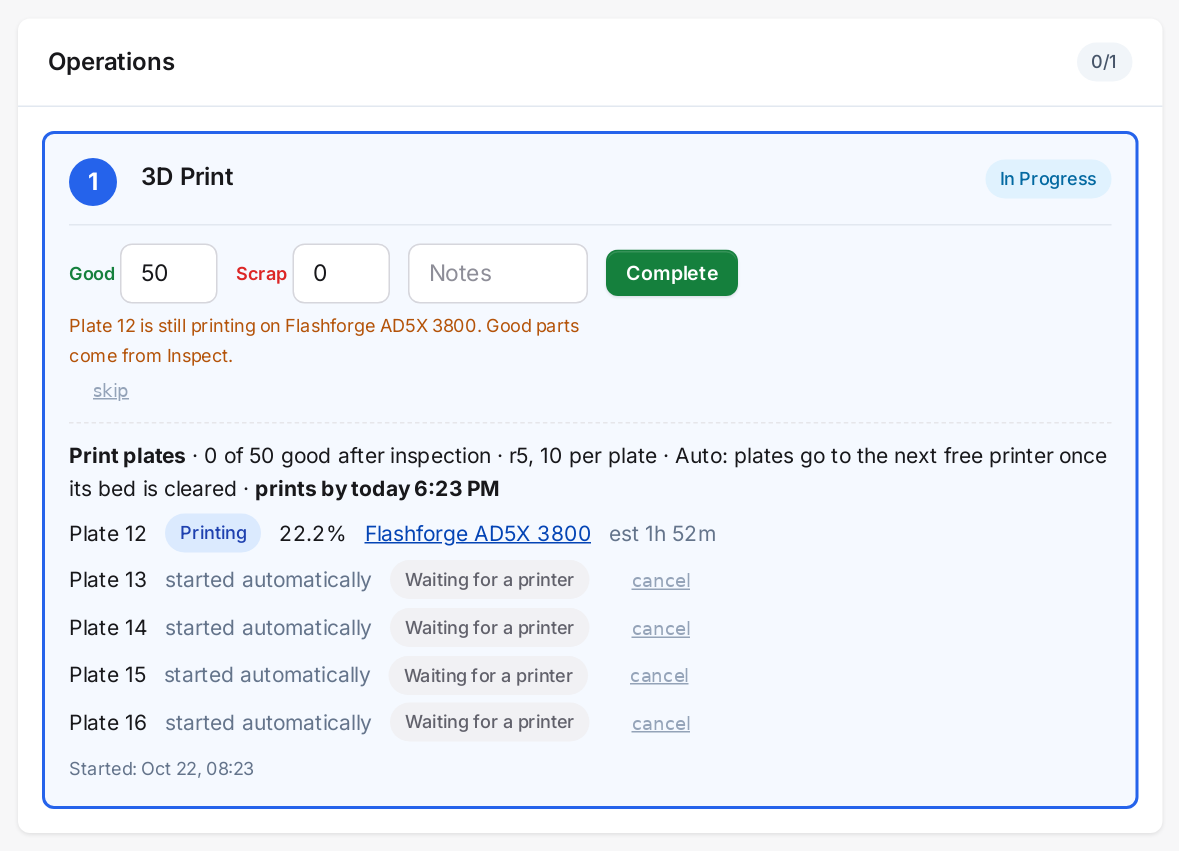 A work order's print step: plates started automatically, one printing, the rest waiting for a printer, and when they'll all be printed
October 18, 2026 · Improved — Manufacturing
a print stopped on the printer asks what to scrap
- A plate stopped on the printer partway through now shows Inspect on the printer's page like a failed one, with the whole plate filled in as rejected. Save it to book the scrap, or count anything usable as good
October 18, 2026 · Improved — Manufacturing
pick a print color from what's loaded
- Approving a print file offers the colors loaded in your printers right now, with where each is, plus the slicer's color and a color picker. A plate only prints on an exact color match, so picking a loaded color means it won't wait for a shade no printer reports. Multi-color plates get the same list per tool
October 18, 2026 · New — Manufacturing, Admin
download Machine Connect from Kaniva
- Download Machine Connect on Settings → Printing and Manufacturing → 3D Printers gets the newest version of our Windows app (owners and admins)
- Each connected PC shows its version, with Update available or Unsupported, please update when it's behind, and the app is told when an update is out
October 17, 2026 · Improved — Shipping, Inventory
each device remembers its label printer
- Create label, the Shipping Station and the label page remember the last printer picked on that computer or phone and preselect it; a device that hasn't picked one starts with the printer on Settings → Printing. Sending labels no longer changes the store's default
- Printers are listed with the PC they're on, e.g. Zebra ZP 500 – SHOP-PC (Machine Connect)
October 17, 2026 · New — Shipping, Inventory, Admin
print to your own printers with Machine Connect
- Settings → Printing picks the printer for shipping labels, product/item/bin labels and packing slips: a PrintNode printer, or any printer on the PC running Machine Connect (USB or network, Zebra or office printer). Nothing changes until you switch
- ZPL shipping labels go straight to a Zebra; packing slips can now be sent to a printer from the order and packing pages
- If the PC or printer can't print, Kaniva sends it through PrintNode instead and tells you; without PrintNode it tries once more, then lets you try again. Nothing is ever printed twice
- Print test page for each Machine Connect printer
October 17, 2026 · Improved — Manufacturing
print queue times
- "Clears …" and "prints by …" keep up with the clock on a quiet day, follow the same order printers take plates in, count a plate sent to one printer on that printer, are right on daylight-saving days, and say once started for plates nobody has started yet
October 17, 2026 · New — Manufacturing
when the print queue clears
- Manufacturing → 3D Printers, the Live Board and the dashboard show, per work center, how many plates are waiting and when they'll all be printed (clears tomorrow 3:40 PM, 1.3 days of backlog). Work orders and order lines say prints by …
- Set when each work center is staffed under Hours on Manufacturing → Work Centers: plates only start in those hours, plus one overnight plate per printer. Times are learned from your own prints and how long beds wait to be cleared
- Renaming a work center now moves its 3D printers with it
- A work order's print steps are forecast in order (a lid after the body). Tick Print alongside earlier steps on a step's print file to let it print at the same time instead
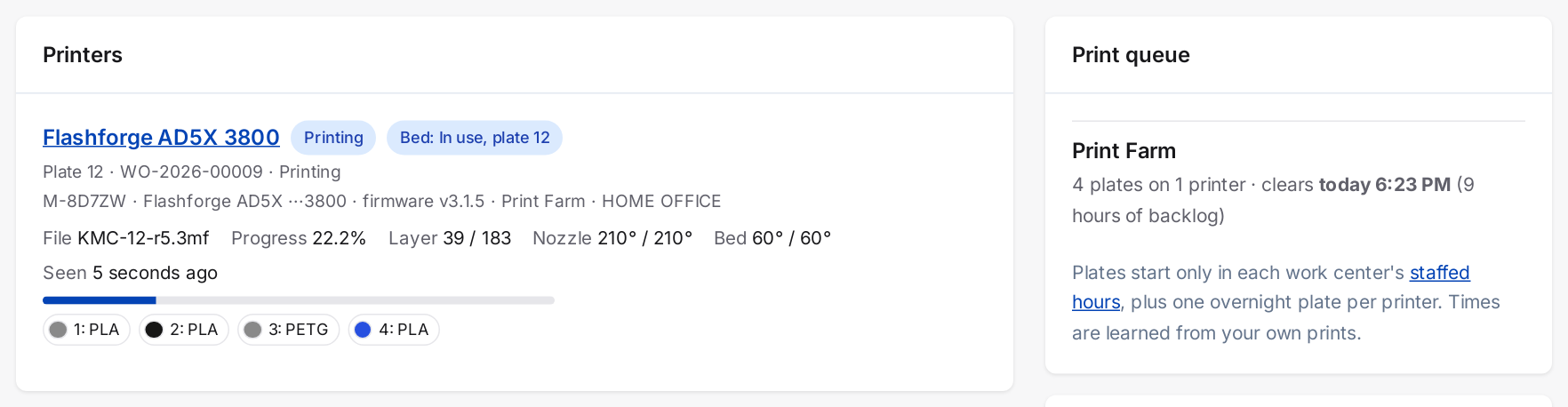 Manufacturing → 3D Printers: each printer's job, file, progress and loaded filament, and when the Print Farm's queue of plates will be done
October 17, 2026 · New — Manufacturing
print capacity alerts
- A push when a work center's 3D print backlog passes its limit (3 days by default, set per work center), when a work order will print after its due date or its order's lead time, and when a finished printer has waited 20 minutes (staffed time) for its bed to be cleared. One email a day lists backlogs and promises at risk
October 17, 2026 · New — Storefront, Manufacturing
live lead time for printed products
- Products that restock by printing can show Ships in about N days on the product page and in the cart when out of stock, worked out from the print queue with the shopper's order included. Never shorter than the product's lead time; in-stock items show normal shipping. Off by default: turn it on under Print settings or per product
October 16, 2026 · Improved — Inventory, Manufacturing
stock history shows each production once
- Producing or consuming stock on a work order now writes one line in an item's Recent stock movements, linked to the work order (it used to write an adjustment line as well, which read like double stock). Older pairs show once too
October 16, 2026 · Improved — Manufacturing
restocked parts go into stock plate by plate
- A restock-by-printing plate's good parts go into stock as soon as it's inspected, so waiting orders can ship straight away instead of after the whole work order
October 16, 2026 · Improved — Manufacturing
print times exclude warm-up
- A plate's printed time now comes from the printer itself, without warm-up; how long it actually occupied the printer shows alongside when that's longer (took 1h 28m · 1h 31m on the printer). Expected times per print file only use printer-measured times
October 16, 2026 · New — Manufacturing
multi-color print plates
- A plate sliced with several filaments prints each tool from a slot holding that tool's color, so colors can't come out swapped. Tick Any color on approval for tools where color doesn't matter. A missing color shows on the printer's page (Waiting: no PLA #000000 loaded for tool 2)
October 16, 2026 · Improved — Inventory
items show how many are short
- When more is held for orders than is on hand, the item page shows Backordered and how many are Short, instead of just 0 available. Items that restock by printing also show how many are coming from the printers and whether that covers the shortfall
October 16, 2026 · New — Manufacturing, Storefront
restock by printing, with backorders
- Tick Restock by printing on a printed part's inventory item: when stock falls to its trigger level, Kaniva makes a started work order for whole plates and queues them, counting plates already on their way
- The product stays buyable at zero stock and shows Printed to order in every theme. Waiting customers raise a queued top-up to high priority, or add a high-priority one
- The restock completes itself when its plates are inspected, putting only the good parts into stock
October 16, 2026 · New — Manufacturing
Auto dispatch for print plates
- A print operation can send its plates out by itself (Auto): the first free printer whose bed has been marked clear takes the next plate. Manual keeps pressing Start. Set it per operation on the BOM's Print files card, with a store default under Manufacturing → 3D Printers → Print settings
- Backorders print first (on by default): plates for high-priority work orders go first, then the oldest. A running print is never interrupted, and every plate still needs the bed marked clear
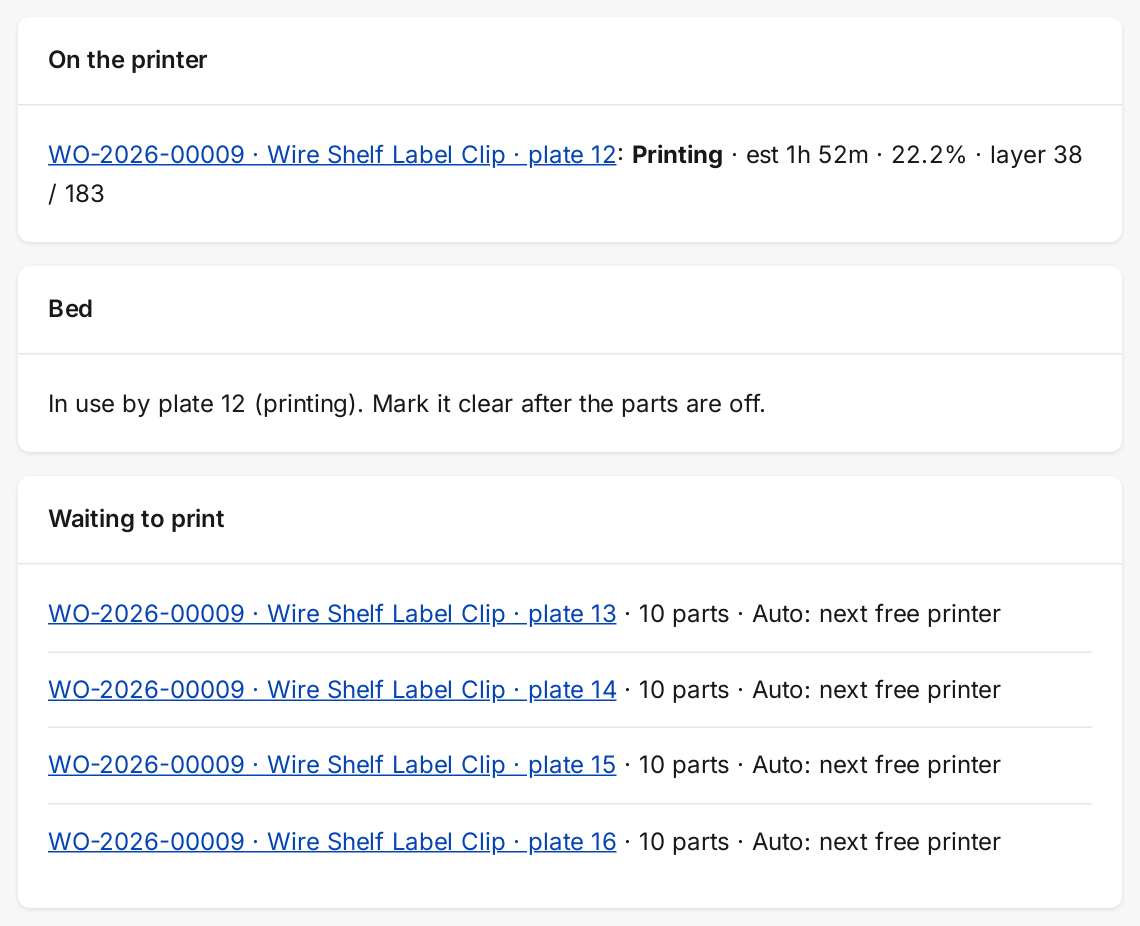 A printer's page: the plate printing now, the bed status, and the next plates waiting for the first free printer
October 16, 2026 · Improved — Manufacturing
real print times on plates
- Each print plate shows the slicer's estimate next to the time the printer measured, and a print operation's time is the sum of its plates' printing time
- The BOM's Print files card shows the expected time per file: the median of its last 10 prints once there are 3, the slicer's estimate until then
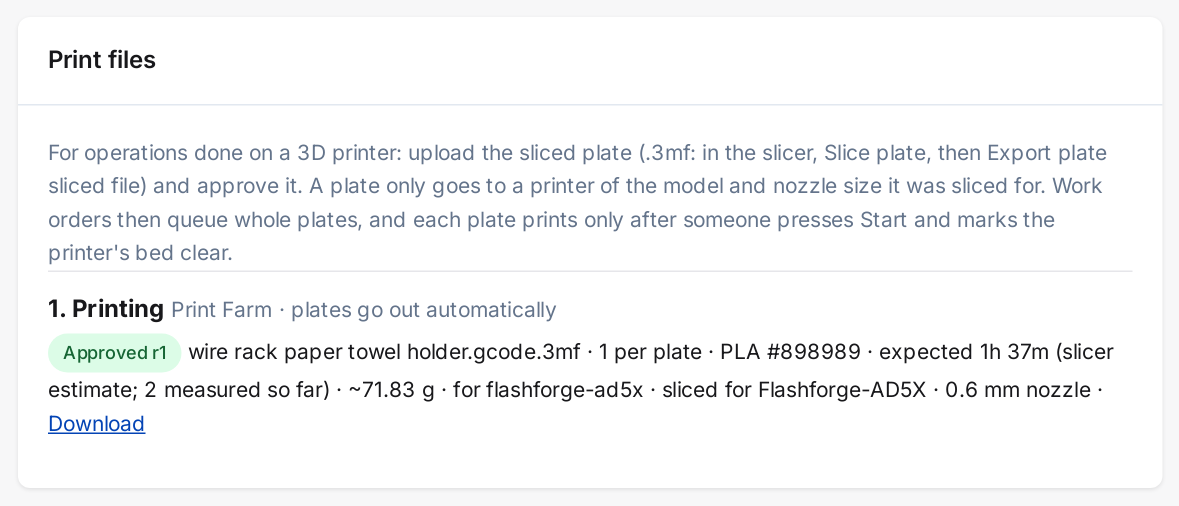 A print file on its BOM: the expected print time, from the slicer until enough real prints have been measured
October 16, 2026 · Changed — Marketing site
Shopify comparison updated for Shopify's annual price rise
- Kaniva vs Shopify now notes that Shopify raised annual Grow from $79 to $89 a month on October 16, compares it with Kaniva Shop at $1,290 a year (and $129 against Grow's $105 billed monthly), and sets Kaniva Solo at $49 against Shopify Basic at $39. Kaniva's prices are unchanged
- The Shopify figures note now cites October 2026 and lists Grow's monthly and annual prices and POS Pro
October 16, 2026 · Improved — Manufacturing
printers say why a plate isn't starting
- When a plate is waiting and the printer doesn't take it, the printer's page, Manufacturing → Machines and the Live Board show why: Waiting: no PLA #FFFF80 loaded, Waiting: nozzle 0.4 mm, file needs 0.6 mm, Waiting: bed not marked clear and so on
- While a plate is printing, the bed shows In use, plate N instead of Needs clearing, which now only appears once the plate is off the printer
- A newly uploaded print file's Color now starts blank (any color); the slicer's color shows as a hint. Before, the slicer's color was filled in, so a plate could only print in that exact color
October 16, 2026 · New — Manufacturing
print plates from work orders, after a bed-clear scan (Machine Connect pilot)
- Upload a sliced .3mf on a BOM operation under Print files; Kaniva reads the printer model, nozzle size, time, grams and filaments it was sliced with, and refuses a slicer project save. Owners and admins approve it with parts per plate, material, color and printer models
- A plate only goes to a printer of the model and nozzle size it was sliced for
- On a work order, Queue plates covers what's needed in whole plates; Start sends one to a printer or the next free one
- Every plate needs someone at the printer to tap Mark bed clear first (scan the printer's new QR label), and each clearance allows one start. A printer that's busy, finished, in error or out of contact can't be cleared
- Inspect each printed plate (good / rejected). The counts go on the operation's job, and the operation completes when enough good parts are in. A finished print alone completes nothing
- A failed print opens downtime and sends a push alert. A start Kaniva can't confirm waits for a person (Check the printer) and is never retried
October 15, 2026 · New — Manufacturing
Machine Connect printer status (pilot)
- Manufacturing → Machines lists the 3D printers a Machine Connect agent reports, with each one's state, file, progress, temperatures and loaded material
- Connect an agent with the code it shows: open its link, or type the code under Connect an agent. Owners and admins only; Remove cuts an agent off at once
- The Live Board shows a Printers row. A printer that stopped reporting shows No signal and one the agent can't reach shows Printer offline, never idle
- Status only for now: Kaniva doesn't start or send anything to a printer
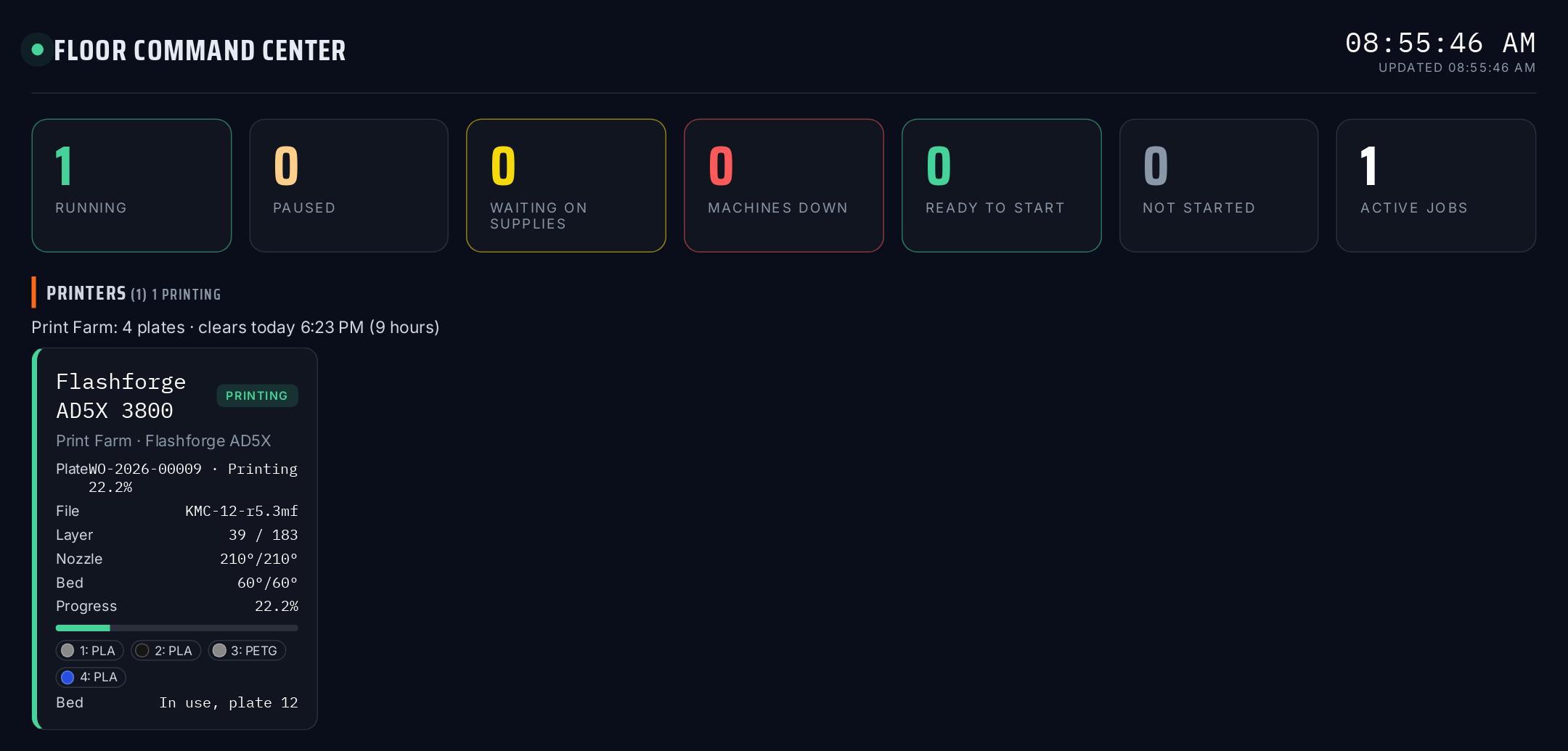 The Live Board's Printers row: what each printer is printing, its layer, temperatures and loaded filament, next to the shop's running work
October 15, 2026 · New — Storefront, Admin
make an offer
- Set a product's Pricing to Fixed price, offers welcome and customers can send you an offer from the product page, with a quantity and a note. Guests confirm their email first
- Answer under Sales → Offers: Accept, Decline or Send counter. Optional auto-accept and auto-decline amounts per product answer offers at once
- An accepted offer holds the stock and emails the customer a Buy now link at the agreed price. Offers not answered or not bought in time expire, and held stock goes back on sale
- Customers see every offer under My offers. Settings for answer time, time to buy, counter rounds and guest offers are at the bottom of Sales → Offers
- On eBay, offers welcome turns on Best Offer with your auto amounts; pay what you want lists at the suggested price with offers below the minimum declined
October 15, 2026 · New — Storefront
pay what you want
- Set a product's Pricing to Pay what you want (Pricing & Cost tab) and customers name their own price, at or above a minimum you choose. Price becomes the suggested price
- The product page shows a Name your price box with quick amounts, and the catalogue shows Pay what you want · minimum $X. Works in every storefront theme
- Customers can change their price in the cart. A minimum of 0 lets them take it free: a free download checks out with nothing to pay and no card
- Orders show Customer's price (suggested $X) on the line
October 15, 2026 · New — Admin
keep a product out of discount codes
- Products have a new switch, Discount codes apply to this product, on the Pricing & Cost tab. Untick it and codes take nothing off that product, while still working on the rest of the cart. A code's minimum order counts only the items it can discount
- Refunds give back only the discount each item actually had
October 15, 2026 · Improved — Admin
tracking progress for each box
- Each box on an order now shows where it is: Label created → In transit → Out for delivery → Delivered, with the carrier's latest message, the expected delivery date and when tracking last checked. Problems and returns show in red
- Scan history under each box lists every carrier scan with its date, time and place
- The box row no longer runs off the side of the screen on phones
- Scans read as a timeline: the time, then what happened in plain sentence case, then where. The separate Tracking Info card is gone when every tracking number is on a box
October 15, 2026 · Improved — Admin
a copy of every step email, and orders that complete when they ship
- Step emails (such as Shipped) now send a copy to the store's admin email again, as the shipping emails did before order steps. Turn it off on Settings → Order steps under Emails and completing orders
- Orders now move to their last step as soon as every box has shipped, instead of sitting on Shipped until the carrier says delivered. Tracking still records the delivery date. To wait for delivery instead, choose When the carrier says it's delivered under Complete shipped orders on the same page
October 14, 2026 · New — Platform
a weekly Build Log on kaniva.io
- kaniva.io/build-log tells the story of each week: what the Kaniva team built, why it matters to a shop, and the week in numbers. It goes back to the week of January 1. It's linked from the footer and from What's new, and listed in the sitemap
October 14, 2026 · Improved — Platform
the Integrations page shows everything Kaniva connects to
- kaniva.io/integrations now covers eBay, Google Shopping, Shopify imports, supplier stock feeds, the ElevenLabs phone receptionist, Stripe card readers, Star receipt printers, PrintNode, NIIMBOT label printers, Google Analytics and the Kaniva API, grouped by what they're for, next to Stripe, PayPal, Shippo and Google Maps
- The list ends with Don't see what you use? and a button that opens the contact form with An integration I need already chosen
October 14, 2026 · Improved — Platform
Kaniva's phone agents keep up with the Help pages
- Kaniva's sales and support phone agents now get the latest Help pages every day. Only pages that changed are sent again.
October 14, 2026 · Changed — Platform
kaniva.io names the shops that run on Kaniva
- The homepage's "We run our own shops on Kaniva" section now lists DirtBound, Bulltear Industries and Star Lab CNC Parts, what each sells, when it started taking orders on Kaniva, and a link to each store.