October 14, 2026 · Improved — Platform
trial emails switch on from Platform Admin
- Platform Admin → Trial funnel has a Trial emails card: switch the day 0, 3, 10 and trial-end emails on or off, choose where replies go, and email yourself a sample of each as any store would get it.
October 14, 2026 · Changed — Platform
Kaniva vs Shopify cost example
- The cost example on the Shopify comparison page now also shows Shopify's total when a store uses Shopify Payments, since the 2% fee only applies without it.
October 14, 2026 · Improved — Admin
back to the product list from a product
- A ← Products link above the product title goes back to the list you opened it from, with your search and filters kept, on phones too. After Save and keep editing, the browser's back button goes to the list as well, instead of an earlier copy of the same product.
October 14, 2026 · Improved — Admin
Save and keep editing on products
- The product edit page has a Save and keep editing button, at the top and at the bottom. It saves and brings you back to the same product on the tab you were on, instead of the product list. Handy when you add a missing weight before listing on eBay.
October 14, 2026 · Improved — Admin
instant delivery updates from your Shippo account
- Settings → Shipping now shows your own Webhook address for Shippo. Add it in your Shippo account's webhook settings (event
track_updated) and orders update the moment a parcel moves, instead of at the next check every 2 hours.
- If Shippo support gives you an HMAC secret, save it on the same page and every update must then be signed by Shippo.
October 13, 2026 · Changed — Storefront
confirming a booking and changing your email
- The Confirm link in a booking email now opens a page with a Confirm booking button, so link checkers in mail apps can't confirm a booking for you.
- Changing the email address on My Account now asks for your current password.
October 13, 2026 · New — Admin, Storefront
product add-ons
- Offer optional extras on a product page: another product you sell (a hardware kit, with its own stock) or a label with a fixed or percentage price (powder coat, rush build). Each product has its own add-ons under its own headings (Add-ons on the product page). Add-ons you offer on many products live in the add-on library (Catalog → Add-ons), and products using them follow its price. On every plan.
- Sold only as an add-on (product Visibility tab) keeps a product out of the shop while it's still offered as an add-on.
- On the order, add-ons sit under their item everywhere: order pages, emails, packing slips, the packing station and pick lists. Refunds, returns and edits fill their quantities in with the item's, and Product Sales can show only what sold as an add-on.
- Phone orders offer a product's add-ons as tick boxes; the phone receptionist and the AI chat know them too.
October 13, 2026 · Improved — Admin
the phone receptionist solves it before passing you the call
- A caller who asks for "customer service" is now asked what it is about, and the receptionist answers what it can first: order status, products, prices, hours and policies. It puts the call through only for what it can't do (a refund, changing or cancelling an order, a custom quote) or when the caller still wants a person.
- A caller without an order number no longer ends up leaving a message. The receptionist finds their latest order from the number they are calling from, and otherwise asks for the name and ZIP code on the order.
- Click Update my receptionist on Settings → AI to give your receptionist the new instructions.
October 13, 2026 · Changed — Admin
headless cart and checkout switched off
- The developer API's storefront cart and checkout endpoints now answer "not available yet" (HTTP 501). They never worked properly (no tax, shipping or payment), so send shoppers to your store's own checkout. The product, category and booking endpoints are unchanged
- The headless product and category endpoints now keep password-protected categories locked, the same way the storefront does for a visitor who hasn't entered the password
October 13, 2026 · New — Admin
eBay selling limits on Settings → eBay
- The eBay page now shows how much eBay lets the connected account list each month, with a link to ask for more. A new account that eBay won't take listings from yet (a limit of 0, or seller registration not finished) gets a warning saying what to do, before you try to list
October 13, 2026 · New — Admin
calculated eBay shipping
- Create my policies on Settings → eBay now offers Calculated by eBay next to free and flat-rate shipping. eBay prices shipping for each buyer from the product's shipping weight and size. It needs USPS, UPS or FedEx, and a product's eBay panel says so if it has no shipping weight yet
October 13, 2026 · Improved — Admin
clearer eBay policy setup
- Create my policies on Settings → eBay: answer how you ship, how many days to ship, what the buyer pays for shipping and your return terms, and Kaniva makes the shipping, payment and return policies on eBay and chooses them. Running it again updates them rather than making duplicates
- Prefer your own? Or make your own on eBay opens eBay's Business policies page (the sandbox one while testing) with what each policy needs, a found / not yet mark per policy, and a button to check again
October 12, 2026 · New — Admin
Returns
- More → Start a return… on a shipped order: choose the items coming back and why. The return gets a number like R-1042-1 to give the customer
- Sales → Returns lists them. When the box arrives, set each item's condition and click Mark received: resellable items go back in stock, damaged or scrap ones don't
- Settle return refunds the items and their tax, less your restocking fee and the return label, plus the original shipping if you refund it. Set your defaults at Settings → Order steps under Returns and change them per return; or close a return with no refund
- The order's Refund Information card now also lists edits and cancels that moved no money
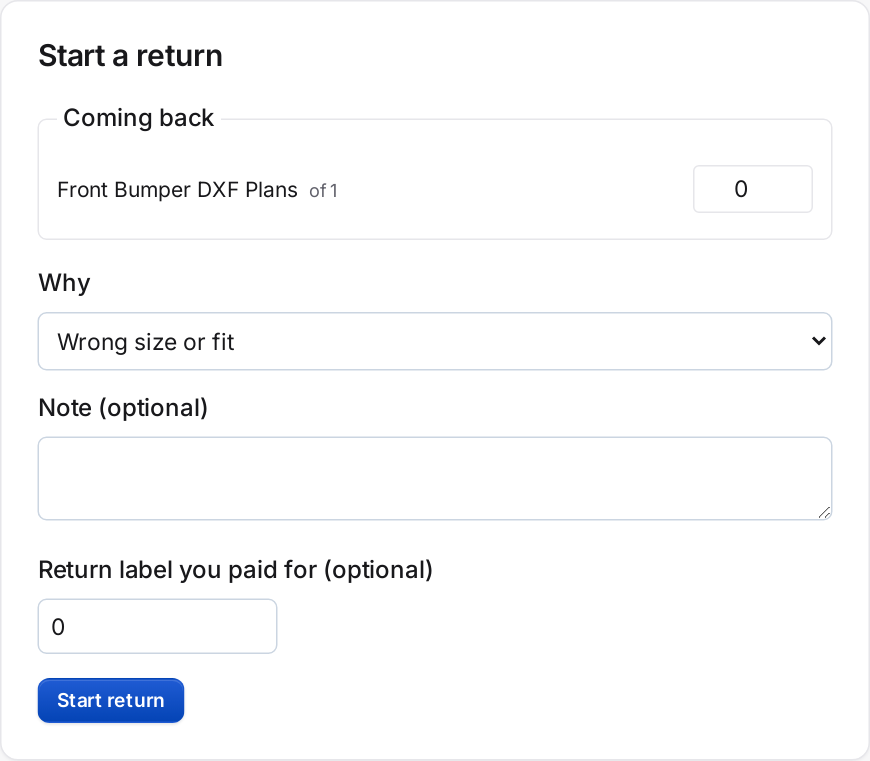 Starting a return: what's coming back, why, and the cost of a return label you paid for
October 12, 2026 · New — Admin
Edit an order
- More → Edit order… on a pending or processing order: change quantities, remove or add items, change a price (with a reason), the shipping charge or the shipping address
- Tax is worked out again. Review changes shows the totals before and after; Save changes refunds the difference through Stripe or PayPal, or leaves a balance the customer pays with the balance link
- Stock follows the items, and the customer is emailed the updated order
- Items already picked, packed or with a supplier can't change. Neither can orders that shipped or have a refund
- The change counts in accounting and the sales tax reports on the day it was made
- Address changes on the order page are now written to its activity
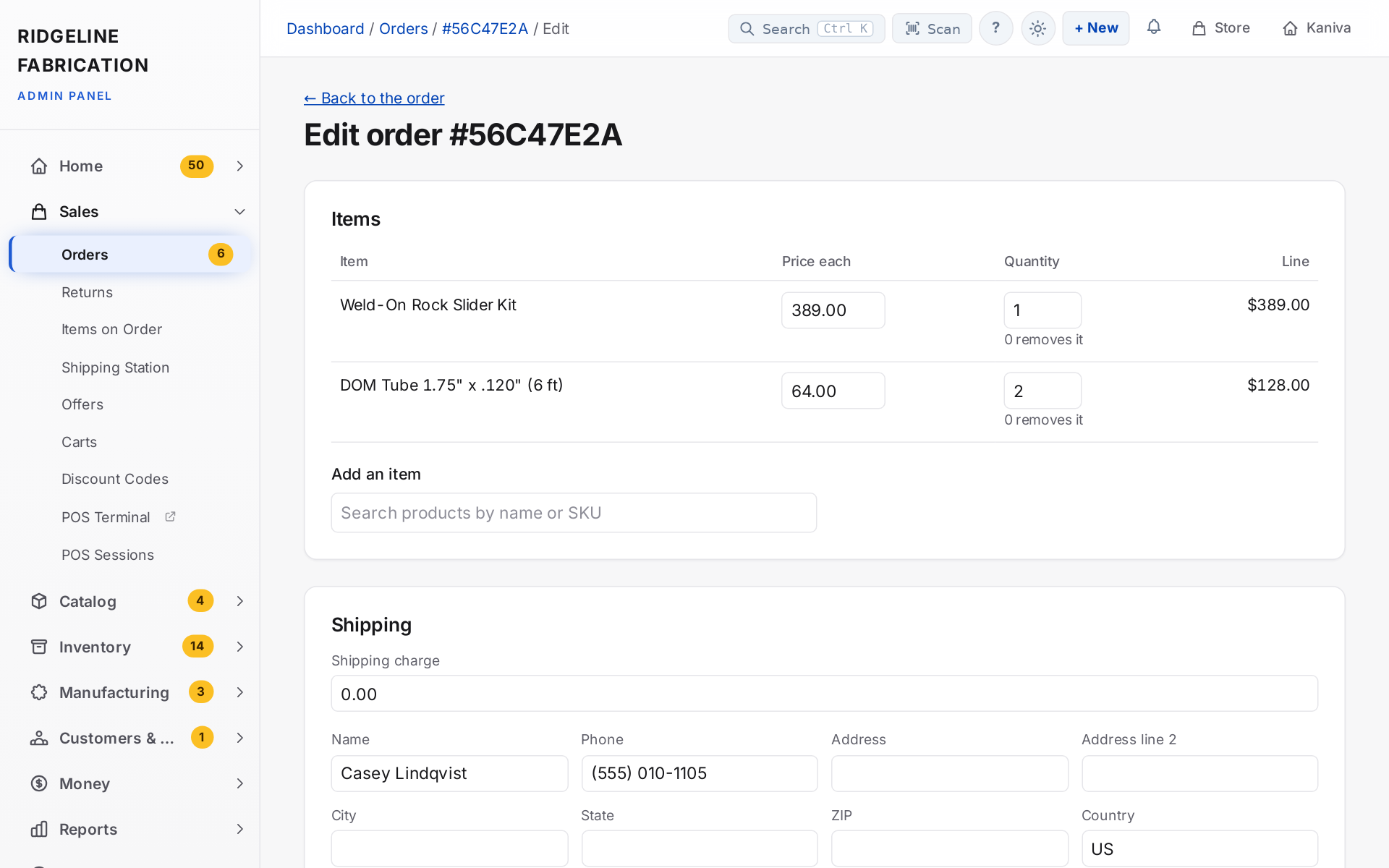 Editing an order: change prices and quantities, add an item and update the shipping
October 12, 2026 · Improved — Admin
Cancelling a paid order refunds it
- More → Cancel order… now opens a form. On a paid order, Cancel and refund is chosen: the money goes back through Stripe or PayPal as the order is cancelled, and if they turn the refund down nothing is cancelled. Before, cancelling never touched the money
- Cancel without refunding is for money already paid back another way. Choose who may use it under Cancelling paid orders on Settings → Order steps (owner and admins to start with)
- An order a dropship supplier already has can't be cancelled, since suppliers don't take back a confirmed order: refund it instead
- Suppliers are no longer emailed automatically when an order is refunded. Tick Ask {supplier} not to ship on the refund form, or use the button on the order's Dropship card
- Advanced: set order status, the Orders list's Change status to… and the API's status update won't mark a paid order Cancelled or Refunded, which skipped the refund. The API's cancel refunds too, unless
refund=false
- A cancelled order that was refunded counts in accounting like any refund: the sale on its day, the refund on the day it was made
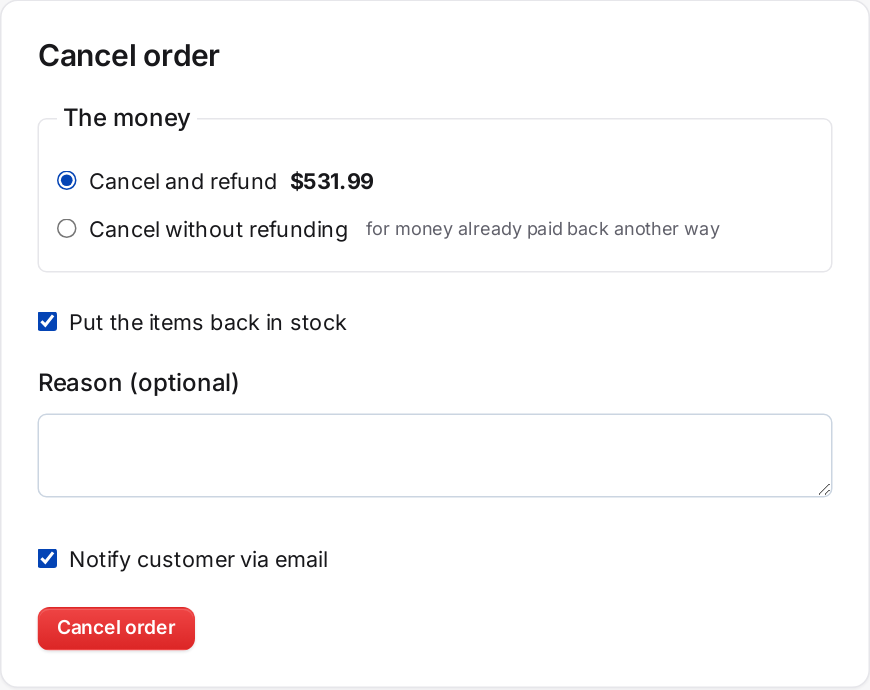 Cancel order: refund the payment and put the items back in stock in one step
October 12, 2026 · New — Admin
Refund by item
- Issue refund… now lists the order's items: set how many of each to refund, untick Back in stock for anything not coming back, and add shipping or another amount. The total adds itself up, tax included
- Each refund is recorded on its own, with its date, amount, items, shipping, who made it and where (order page, register, API, or your Stripe or PayPal dashboard). The Refund Information card lists them, and the customer's refund email lists the items
- A refund made in your Stripe or PayPal dashboard asks you to choose the items it was for, so their stock can go back
- Refunding one item in full stops its downloads, and a builder's royalty counts only the units kept
- Accounting, the Dashboard card and the sales tax reports count a refund on the day it was made, not the day of the order
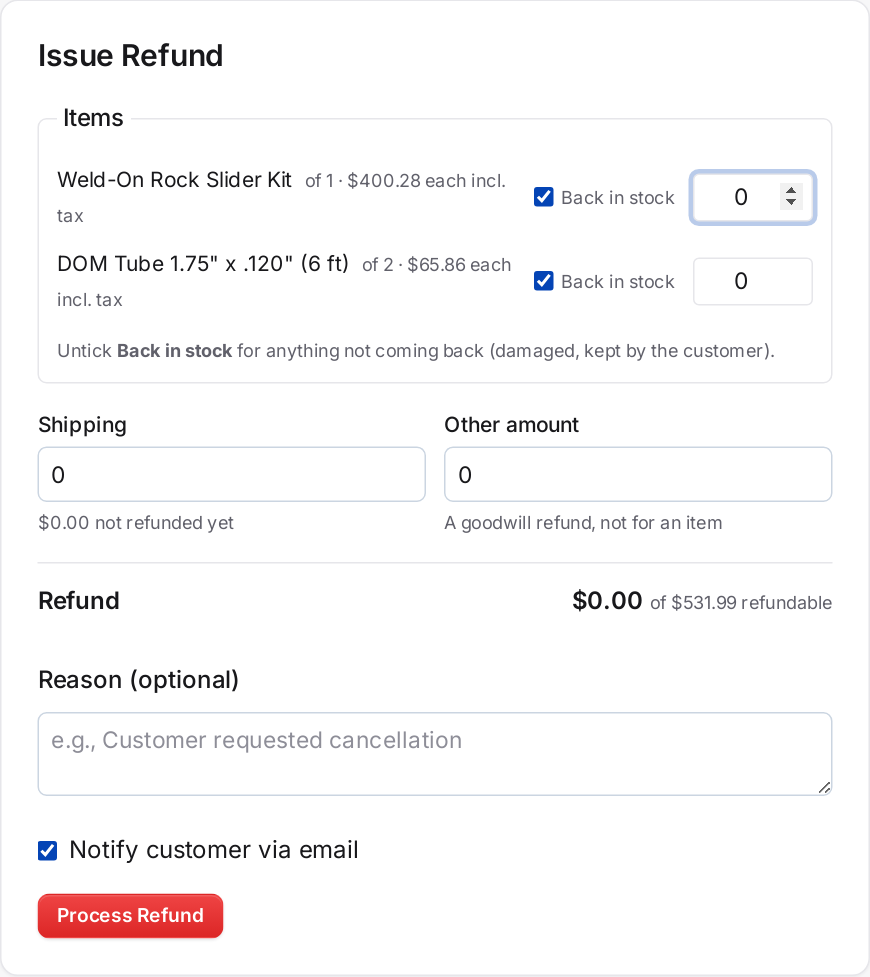 Issue Refund: choose the items and quantities, whether each goes back in stock, and any shipping or goodwill amount
October 12, 2026 · New — Admin
Order webhooks
- order.created (the order is paid or its deposit is), order.updated (its status, payment, shipping or tracking changes) and order.fulfilled (it ships) now fire. They were listed but never sent
October 12, 2026 · Improved — Admin
Dropship suppliers hear about cancellations
- Cancelling or refunding an order that a supplier already has now emails them once to not ship it. The order's Dropship card shows when they were told
- The PO stays open and the supplier's tracking link keeps working, with a note that the order was cancelled, so a parcel that already went out can still be tracked
October 11, 2026 · Changed — Admin
Order stock comes off the shelf when it's packed, not when it's ordered
- With Advanced Inventory, a storefront or phone order now holds its stock when it is placed. Available stock drops straight away, so nothing is sold twice, but the units stay on hand in their bins and show as Reserved on the item
- Picking on a phone marks each line as picked and moves its units from the bin to Packing, a staging spot that isn't a shelf, so shelf counts stay right while orders sit in totes. Nothing else is ever picked or sold from Packing
- Packing the order (putting its items in a box) takes the stock from Packing; anything not picked on a phone comes from the home bin. An order marked shipped or completed without packing takes it then
- Cancelling, failing or refunding an order before it's packed lets go of the hold, and no bin changes, because the stock never left the shelf
- POS sales still take stock at the counter. Orders placed before today took their stock when they were placed and aren't taken from again
October 10, 2026 · New — Admin
New Inventory Item in the + New menu, and a default home bin
- + New at the top of the admin now has New Inventory Item (stores with Advanced Inventory)
- The new-item form starts on a default Home bin instead of asking every time. Tick Use this bin for new items to set it; until then it starts on the bin most of your items already use
October 10, 2026 · New — Admin
Ticket replies show whether the email went out
- Under each reply on a support ticket, yours or the AI's, Kaniva now shows Emailed to the customer's address with the time, or Email not sent with the reason, such as no email address on the ticket or the mail server refusing it. Before, a reply said "Reply added" and there was no way to tell from the ticket whether the customer got it
October 9, 2026 · New — Admin
One greeting for stores that share a phone line
- Stores on one ElevenLabs account can have a single front-door agent that greets for the company, works out which store the caller needs from what they say, and puts them through to that store's own receptionist, which picks up from what the caller already said instead of greeting again. Calls are filed in the store they were transferred to. Set up with
receptionist:front-door
October 9, 2026 · New — Platform Admin
Traffic and recent errors in the server health feed
- The health address now carries the last hour of web traffic across the platform and every store domain's own log (requests per minute, status codes, busiest paths, which stores and domains, bots, recent 5xx), the last backup, and the latest logged errors, for the Command Deck's NOC view. A burst of 5xx responses or a backup more than a day old is an anomaly
- Certificates are checked hourly on the platform host, every store's custom domain, and any extra domains listed under Settings → Ops health: a failed handshake or chain alerts at once, and an expiry inside 14 days warns (7 days, bad)
October 9, 2026 · New — Platform Admin
Server health and anomaly alerts
- Platform Admin → Settings → Ops health gives the Command Deck a token to read the server's vitals (load, memory, disk, database, queue, errors, scheduler heartbeat, deployed version). Every five minutes the server checks itself and pushes an alert that stays on screen and buzzes to the phones subscribed on the store you choose, nags every 30 minutes while it lasts, and sends an all-clear
October 8, 2026 · New — Admin
Step through open tickets from the ticket page
- A ticket's page has Newer open and Older open at the top, with where it sits in the open queue, so you can work through tickets without going back to the list
October 8, 2026 · Improved — Admin
The Locations list fits a phone
- Location names no longer wrap a letter at a time, the code is shown only when it differs from the name, children indent less, and Edit and + Child become compact buttons on narrow screens
October 8, 2026 · Changed — Admin
NIIMBOT Position starts at 0
- The Position nudge for NIIMBOT prints now starts at 0 on a new phone instead of −3 mm; the right value depends on the printer and roll, and the one you pick stays saved on your phone
October 8, 2026 · Improved — Admin
Add a supplier from the item form
- + New supplier under Primary Supplier on an item's Add and Edit pages makes a supplier from a name (and website) and selects it, without backing out of the item
October 8, 2026 · New — Admin
Blog posts over the API
- API keys with the new blog scopes can list, create, update and delete blog posts and how-to articles, upload their images, and list or create categories and tags. Content can be sent as Markdown. Built so an AI writer can post for you; the endpoints are on Settings → API → Documentation
October 8, 2026 · New — Admin
The next part number is suggested on a new product
- New Product offers the next part number in your own sequence (3738 → 3739, DB-0099 → DB-0100), skipping any already used, with a Use it button. Typing a part number shows at once whether a product, variant or inventory item already has it. Duplicates stay allowed
October 8, 2026 · Improved — Admin
The Scan page scrolls to the part you just scanned
- On a phone the scanned part's card used to land under the keyboard; the page now scrolls it into view
October 8, 2026 · New — Platform
A 24/7 support number on kaniva.io
- The footer, Contact and Pricing pages show Kaniva's support line, (612) 460-0069: an AI agent with the whole manual that can put you through to a person, take a message, and start your trial store on the call. The number is set in Platform Admin → Settings → Phone agents
October 8, 2026 · Improved — Admin
Receptionist hears your part names, runs on a known model, and can ask you to accept a transfer
- The receptionist is told your store's distinctive words (part names, vehicles, categories) so "MOLLE" is not heard as "Molly", runs on a fixed model after a caller got a page of garbled output on the default, and Ask me to accept on the phone under Live transfers makes your phone ring with the brief before the caller is connected. Click Update my receptionist to apply
October 8, 2026 · Improved — Admin
The phone receptionist finds close product matches
- Asked for a "ceiling MOLLE panel", the receptionist now finds the "Overhead MOLLE Storage Rack": exact matches first, then the same matching the live chat uses (product embeddings when your store has them, else any word), and it tells the caller when a match is close rather than exact. It also asks for a name only when it needs one and for an email only when taking a message, and for custom work it says what your Business context box says (for example, email a drawing with dimensions and materials). Click Update my receptionist on Settings → AI to push the new prompt
October 7, 2026 · New — Admin
A phone receptionist for your store, in your own ElevenLabs account
- Settings → AI takes your ElevenLabs API key, and Set up my receptionist builds a receptionist agent in your own ElevenLabs account, on your minutes: order status verified by caller number, ZIP or name and ZIP, product and price questions from your catalogue, your hours, address and policies, messages for the team, and live transfers to you during your hours. Every call becomes a ticket in your CRM with the transcript. Add a phone number in ElevenLabs and it answers
October 7, 2026 · Improved — Admin
Tote cards carry the phone-pick QR
- Each tote card now has the same Scan to pick on a phone QR as the pick list, for the whole batch, so a picker can start from the totes without printing the list
October 7, 2026 · Improved — Admin
Bin labels carry a QR code for phone picking
- Every bin and shelf label (3" × 1.5" thermal, PDF and NIIMBOT) now prints a QR code of the location's code beside its name, so the phone camera in pick mode reads the label at a glance. The barcode stays for handheld scanners; both say the same thing
October 7, 2026 · Improved — Admin
Cost & Pricing line items link to where the number is set
- On a product's Cost & Pricing page, each line in the itemisation is a link: a material or sub-assembly opens its inventory item to change the unit cost, an operation opens its cost center to change the hourly rate. A material with no unit cost says so under its name
October 7, 2026 · Improved — Admin
A work order says where it stands in one line
- The top of a work order now reads Ready to start, Waiting on 6 in of rod (with what is spoken for by earlier orders) or In production, 2 of 4 operations done, with the product, customer order and due date under it and the Start or Complete button right there, with its reason when it is greyed out. Consumed and progress columns appear once production starts. Print pick slip prints just the parts to pull, with units and bins
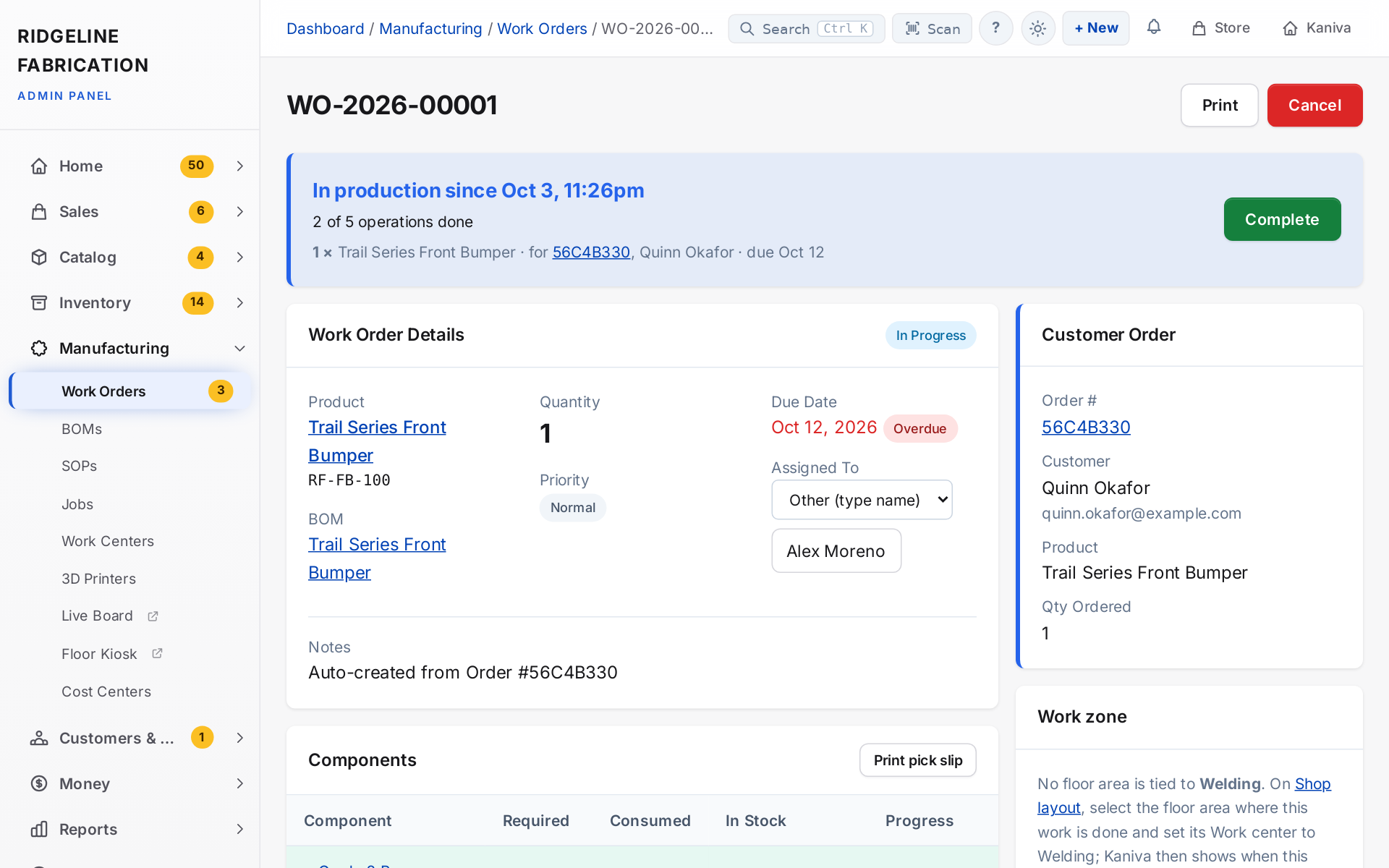 A work order's summary: in production since when, how many operations are done, and the customer order it's for
October 7, 2026 · Improved — Admin
Work order components show their unit, bin and cutting note
- On a work order, every component quantity now carries the part's unit spelled out (18 inches, 2 each, 1 sheet), the row shows the part's home bin and the BOM line's note, and the shortage note reads in the same unit. No more guessing whether 18 means rods or inches