October 7, 2026 · Improved — Admin
The Work Orders list opens on open orders, with a materials filter and a ready-first sort
- Manufacturing → Work Orders now shows drafts and in-progress orders by default (pick All Status to see finished ones), can filter to Ready to start or Short, and can sort Ready first, oldest first so the next job to run is at the top instead of at the bottom of a scroll. It remembers the filters and sort each person used last and opens that way next time; Clear forgets them
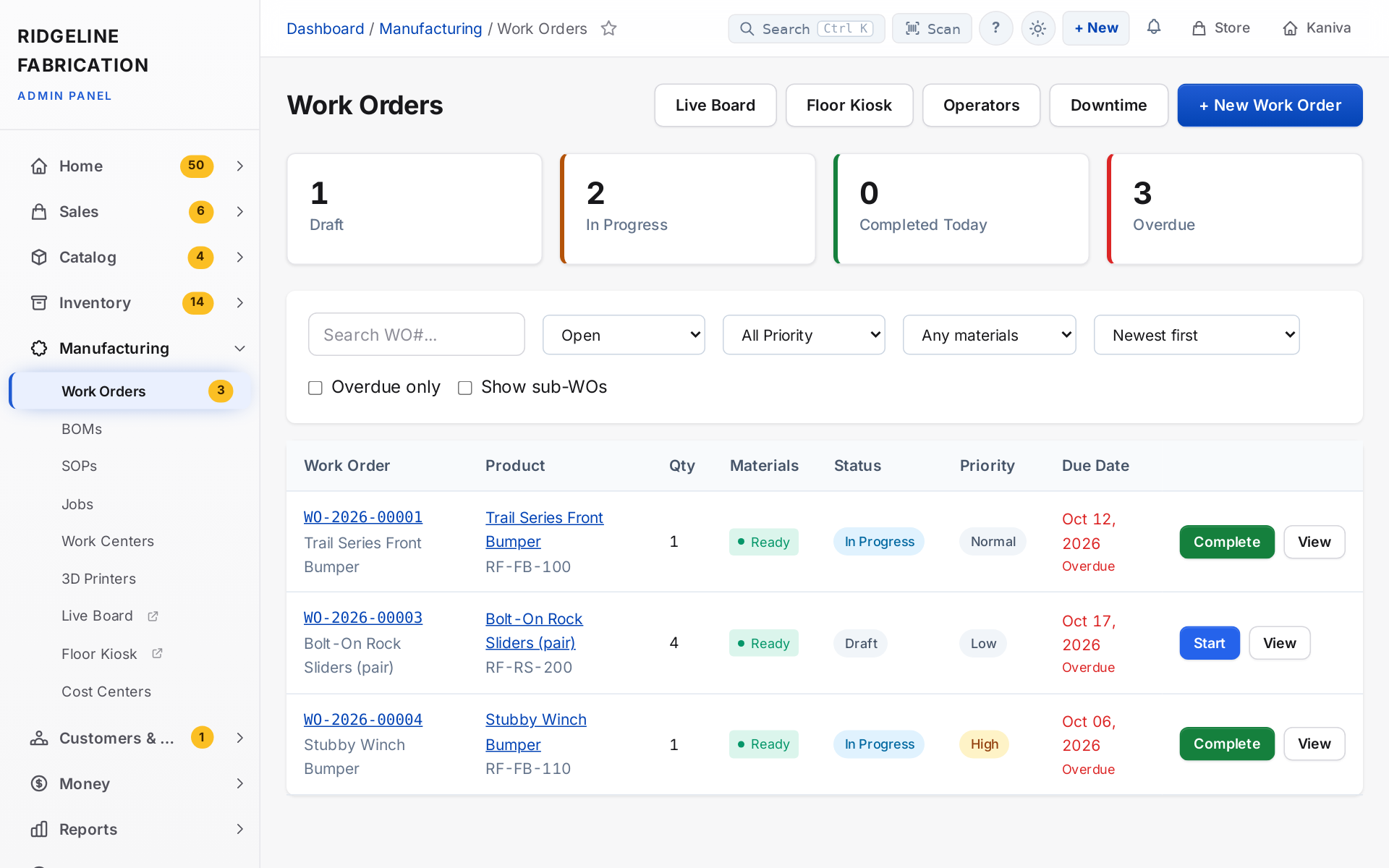 The Work Orders list: counts at the top, open orders with their materials status, and Start or Complete on each row
October 7, 2026 · Improved — Admin
Work orders share stock first come, first served
- When several work orders need the same component, the earlier ones (in progress first, then drafts by date) can start and only the ones the shelf can't cover show short. Before, every work order compared itself to the whole shelf, so with enough rod for three trays all seven showed short, or none did. The shortage note, the Components table and the Ready / Missing items column on the work-order list all follow the same rule and say how much is spoken for by earlier work orders, and the item's page shows, right under its stock numbers, how many open work orders need it and how much you are short
October 7, 2026 · Changed — Platform
The security page says exactly where your data lives
- kaniva.io/security says kaniva.io is served through Cloudflare's proxy, which handles the DDoS protection and web application firewall listed there, and describes the data split as it is: each store's products, orders, customers and CRM records in that store's own database, and sign-in details in one central accounts database so a person logs in once
October 7, 2026 · Changed — Platform
The public site, trial emails and Help describe Solo and Shop
- kaniva.io's pricing, homepage, features, compare, about, terms, sign-up and register pages, the footer and the trial-ending email now describe Pay As You Go, Solo, Shop and Enterprise, with yearly billing and the Solo order cap, and say that every plan includes every module. The pricing page explains what happens at the cap and how fast support gets back to you on each plan
- Help → Billing & Plan rewritten for the plans; "add-on" wording across Help now says the module is included
October 7, 2026 · New — Platform
A heads-up near the Solo order cap, and the support promise on every ticket
- A Solo store gets one email and one admin notification when it passes 80% of its monthly order cap, and one more when it reaches it. Nothing stops; the notice says so and points at Shop. The team is copied
- Support tickets filed from the phone line now carry the caller's plan (Pay As You Go, Solo, Shop, Enterprise) with the response time that plan is promised, and the phone agents can tell a caller what to expect. Platform Admin → Tenants shows each store's orders this month against its cap and its support promise
October 7, 2026 · New — Platform
Pick Solo or Shop, monthly or yearly, from your Billing page
- Billing & Plan now offers Pay As You Go, Solo, Shop and Enterprise side by side. Pick monthly or yearly billing (yearly is ten months' price), switch between Solo and Shop any time with the difference prorated on the next invoice, and move to Pay As You Go when Stripe Connect is set up. The page shows your orders this month against the Solo cap
- Add-ons are gone from Billing. Every plan includes every module, so there is nothing to add or remove. Stores that bought add-ons on the old Monthly plan keep everything
October 7, 2026 · New — Platform
Solo and Shop plans, and a store's monthly order count
- Two new plans join Pay As You Go: Solo ($49 a month, everything included, up to 200 orders a month) and Shop ($129 a month, everything included, no order cap). Enterprise is quoted. Every plan now includes every module, so there are no add-ons to buy. Not yet visible to stores: the switch to the new plans is reviewed and deployed as one change
- Product limits are gone. No plan caps how many products a store can list
- Kaniva now counts each store's paid orders and POS sales for the month, which is what the Solo cap reads. Abandoned checkouts, cancelled and refunded orders don't count
- A store whose trial has ended on Pay As You Go without setting up Stripe Connect sees exactly that on its dashboard, with the Stripe Connect setup page still open to it
October 6, 2026 · Improved — Admin
The API can create a complete product, photos included
- With a products:write key,
POST and PUT /api/v1/admin/products now save the SKU, the product type (physical, digital, build to order or bundle), stock tracking and visibility; before, the SKU was dropped, stock tracking couldn't be turned on, and every new product came out digital. New products are physical unless you say otherwise, as on the admin form. Photos can be uploaded with the new POST /api/v1/admin/products/{id}/images, and product reads now include the photo URLs. See Help → Developer API
October 5, 2026 · New — Platform
Kaniva's phone agents can start a trial on the call
- Sam and Ryan offer it once and never push. The caller picks: get the trial link by email, or have the store set up right then. For a set-up store, the caller is emailed a link to choose their password; nothing is created for an email that already has a login, and a store nobody claims within 14 days is removed on its own
October 5, 2026 · Improved — Admin
Phone support calls with nothing to do are closed automatically
- A support call that was solved on the call, a how-to question with no call-back asked for, or a call where nothing was described (a hang-up) now files its ticket as Resolved with a note saying why, instead of leaving an open ticket. Bugs, feature requests, billing questions and unresolved problems stay open, as does any call where the caller asked for a person or left a message
October 5, 2026 · New — Storefront
Theme wording can be left empty on purpose
- In Content → Storefront Theme → Customize, a blank box still keeps the default wording shown in grey. To leave that spot on the page empty instead, tick Show nothing here under the box: the small label above a heading, a tile label, a footer heading. Untick it to get the default back
October 5, 2026 · New — Storefront
Trailhead's "Shop by vehicle" works for any featured categories
- On the Trailhead theme, Content → Storefront Theme → Customize now calls the block Featured categories: pick your vehicles, or any collections you want up front. A new choice, Featured categories are, keeps the vehicle treatment (make, model and years, plus the "Fits" line on products) or shows plain collection names. Every word on the tiles and menus is yours to change: the tiles' label and heading, the menu heading, and the word for the products counted ("3 parts" can be "3 items")
October 5, 2026 · Changed — Admin
Graphite in Light mode is the admin's default look
- New people, and anyone who never picked a look, now get the Graphite palette in Light mode. Your own choice under Appearance in the top bar is kept as it was
October 5, 2026 · New — Admin
The card reader shows the cart as you ring up
- With a Stripe Reader S700 beside the register, the customer now sees each item, the tax and the total on the reader's screen as you add and remove things, then the payment screen when you press Card Reader. Nothing to set up: it starts once a register has picked its reader
- The S700 is now the reader we recommend everywhere in POS settings and Help, since Stripe has discontinued the BBPOS WisePOS E (which still works)
October 5, 2026 · New — Admin
Home shows everything that needs you, with a jump to each one
- Click Home in the sidebar and the page opens with Needs attention: one card for every page with something waiting (orders to ship, boxes to label, reviews to approve, stock requests, items to reorder, deliveries due, inventory alerts, overdue work orders, open tickets, overdue tasks, callbacks, bookkeeping that needs a look). Each card says how many and opens the list filtered to exactly those records. When there is nothing, it says so
- The Home badge in the sidebar is the total of everything waiting, so you can see from any page whether Home has something for you. Numbers refresh every minute, like the other overview pages
October 5, 2026 · New — Admin
Help page for staff and admins
- Help → Staff and Admins explains the roles, how to add a new staff member, and how to give someone who already has a Kaniva login (from another store) access to yours: they open your store once, then you change their role on Customers & CRM → Customers
October 4, 2026 · New — Admin
Live transfers with a brief first
- During your hours, a caller who asks for a person is put on hold while your phone gets a push with who it is and why. Tap Accept and the call is put through, or Decline with a quick note the agent passes on before taking a message. No answer in 30 seconds means a message too
- Set your days and hours under Settings → AI → Phone agents (ElevenLabs) → Live transfers, and pause transfers for the rest of the day from the decline screen
October 4, 2026 · Improved — Admin
Phone agents take messages for a call back
- When a caller asks for a person or leaves a message, your sales or support agent takes their name, the best number, a good time and the message. It lands in Customers & CRM as a Call back … task due today, with the message at the top, and your phone gets a push notification
- Add the fields
message_for_team, callback_number and callback_time to your agents (Help explains how)
October 4, 2026 · New — Admin
Connect your ElevenLabs phone agents
- If you run AI voice agents in ElevenLabs, Settings → AI → Phone agents (ElevenLabs) gives your store its own webhook address. Paste in your ElevenLabs webhook secret and say which agent handles sales and which handles support, and every finished call lands in Customers & CRM: the caller as a contact, the call with its transcript, a call-back task when a sales caller asks for a person, and a ticket for a support call. Setup steps and the fields to collect are in Help
- The AI Triage settings page is now Settings → AI: ticket triage, live chat, the voice receptionist and phone agents in one place
October 4, 2026 · Improved — Admin
Shipping a box opens the station on its order
- A box's Ship button on the order page now opens the Shipping Station showing the order and how many of its boxes have labels ("1 of 3 boxes labelled"), with that box loaded
October 4, 2026 · Improved — Admin
Two pages you can now find
- Inventory → Items has a Print item labels button that opens the full item list for printing labels in bulk, and the Builders page has an Invoices button for builder license-fee invoices
- Deposit orders show their payment status as Deposit paid instead of "Deposit_paid"
October 3, 2026 · New — Admin
A rewritten Help section with step-by-step guides
- Help (bottom of the sidebar, or the ? beside any page title) is now one page per topic instead of one very long page, with a search that looks across every topic and an "On this page" list. The ? opens the topic for the page you're on
- New Daily tasks guides, each with a flowchart and screenshots with numbered steps: set up your store, add a part and put it on a shelf, order and receive stock, pick, pack and ship an order, run a build-to-order job, a day on the POS, count and adjust stock, and cancel or refund an order
- Every page was checked against the admin as it is today: menu paths and button names now match what you see, pages that no longer exist were taken out, and newer features (setup, order steps, bins and scanning, restocking on cancel or refund, themes, the storefront edit bar) are covered
October 3, 2026 · New — Storefront
Edit from the storefront
- Signed in as the store's owner or an admin, every storefront page shows a slim bar along the bottom of the screen: Edit product (or Edit post, Edit page, Edit category, Edit homepage) opens the admin screen for what you're looking at, and Admin opens the dashboard. Hide folds it into a small pencil tab in the corner (remembered in that browser). Customers never see it. Works on every theme
- Trailhead: the phone menu starts with a Store admin button for owners and admins, and on phones a tap on the account icon now opens the account menu (My account, My orders, Store admin, Log out) instead of going straight to the profile
October 3, 2026 · Improved — Storefront
More hero options
- The homepage hero (Website → Homepage → edit the hero) gets a second button you can edit, a text position on a computer (left, right or center; on Trailhead the shading follows the text), and an optional phone photo with its own position, for when the wide photo doesn't crop well on a tall phone screen
October 3, 2026 · New — Storefront
Your reviews on the homepage, and a reviews page
- New /reviews page: your rating, a five-to-one-star breakdown (tap a bar to see only those), sorting, and every approved review with the product it's for
- On Trailhead the homepage hero shows your rating ("4.8 out of 5 from 1,728 reviews"), linking to the reviews page. It needs at least 5 reviews and can be turned off in Customize → Homepage blocks
- A homepage Testimonials section is now a reviews band: your rating and three real five-star quotes naming their product. Choose which ones with ☆ Feature on homepage on the admin Reviews page; with none chosen it picks your latest five-star reviews, one per product and reviewer
- Fixed: Testimonials sections on every theme printed made-up sample quotes ("Happy Customer"); they now show only your real reviews, and nothing until you have one
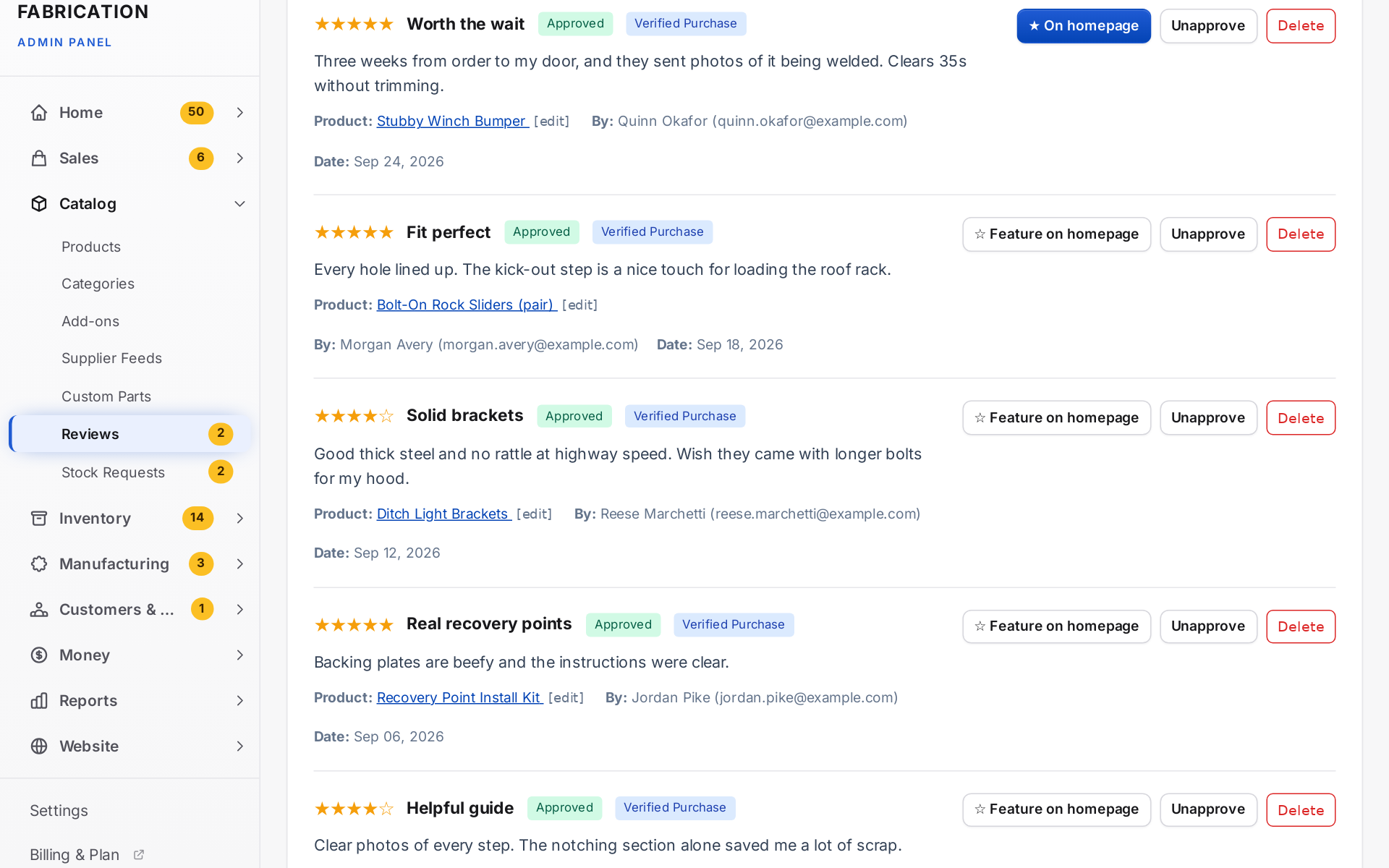 Approved reviews, each with a Feature on homepage button
October 3, 2026 · Improved — Storefront
Best sellers first, and vehicle pictures in the menu
- The product list now sorts by Best sellers by default: units sold on completed, processing and shipped orders, then approved reviews. "Most popular" used to count downloads, which is zero for physical parts, so the list came out in the order products were added
- "You may also like" on a product page fills up with best sellers too
- A homepage Featured Products section has a new Products to show choice: the products ticked Featured (as before), Best sellers, or Best sellers that are in stock
- On Trailhead, Shop by vehicle in the category bar shows each vehicle's category picture as a tile, and the phone menu shows a small picture beside each vehicle
- Vehicle and category pictures are scaled to fit their tile instead of cropped, so a vehicle profile keeps both bumpers
October 3, 2026 · New — Storefront
About-page blocks in the page builder
- Four new blocks: Story (photo, text, up to three facts and a button), Promises strip, Photo Gallery (up to eight photos) and Call to Action (heading, text, two buttons, optional background photo)
- They work on every theme; on Trailhead the Story is the homepage's dark story band and Promises reuse your trust strip when left blank
- Fixed: a Two Columns block never showed its left column's text
- On Trailhead a Photo Gallery's last row is always full, for any number of photos from 1 to 8
October 3, 2026 · Improved — Storefront
Trailhead pages and Contact page
- Text pages (Shipping, Returns, Terms, Privacy…) have a Help & info menu on the left listing your pages and Contact, with the page you're on marked; the page heading is drawn once, large, and the text sits in a readable column
- Pages with photos or product rows (like About) run full width, with the opening line set larger; photos are wide with an optional caption over a dark fade, and a block background color you picked is kept as a band
- The Testimonials block now shows your real reviews (approved, 4 stars and up) instead of sample quotes, and nothing until you have one
- The Contact page is new on Trailhead: a dark band with tiles to call, email, get directions and see your hours; the message and callback forms are two tabs of one card; and beside them Before you write links, your reply-time note, an optional shop photo and your social links
- All of it comes from your pages and Settings → Contact; the help menu, quick-answer links and photo are under Customize → Pages & contact
October 3, 2026 · New — Storefront
A fuller Trailhead header
- On a computer, Trailhead's header now has three rows: a strip in your main color with your trust lines and a "Questions? Contact us" link, your logo beside a wide search box (it names your vehicles, e.g. "Search parts for your Cherokee XJ, Comanche MJ…"), and a category bar
- The category bar starts with Shop by vehicle, then lists your categories; pointing at one opens its sub-categories. Categories that don't fit go under More, and In stock and Shop all sit on the right
- It's built from each store's own trust lines, vehicles and categories, so it works for any store on Trailhead; a store with no vehicles simply has no Shop by vehicle. Prefer the single dark row? Choose Simple under Customize → Look → Header
- Phones keep the compact header, with the strip's first line above it
October 3, 2026 · Improved — Storefront
Finding products on Trailhead
- The menu (☰) now carries the catalogue: search, All products and In stock, Shop by vehicle, and every category with its sub-categories, so any product is two taps from any page
- The Shop page shows All products and In stock up top and each category's sub-categories under its tile on phones too; the product list's Categories & filters panel opens from the left like the menu
- On a computer, Shop in the header opens the same catalogue when you point at it: vehicles, every category with its sub-categories, and All products / In stock. Clicking Shop still opens the Shop page
October 3, 2026 · Improved — Admin
Admin polish
- On phones, tab bars stay on one line and scroll sideways (with the current tab in view) instead of dropping a tab to a second line, stat cards sit two across, card headers put their description under the title, and a long form's Cancel sits beside its Save
- Empty pages use line icons instead of emoji, button styles and colors match the rest of the admin, a long page title in the top bar ends in "…" instead of wrapping, and the "Gross / Net sales" note explains itself when tapped
October 3, 2026 · Changed — Inventory
An item's SKU is its product's part number
- A linked item's SKU is now the product's part number (a variant's item: the variant's SKU), shown read-only on the item and changed on the product, so a part has one code everywhere. When it changes, the old code still scans, so printed labels keep working. Parts that aren't products keep their own SKU
October 3, 2026 · Changed — Inventory, Catalog
Label buttons say which label
- Print item label, Print product label and Print bin label (and their plurals on the lists) instead of a plain Print label everywhere
October 3, 2026 · Changed — Inventory
Product details live on the product
- An inventory item linked to a product shows the product's name, description and photo with an Edit on product link, instead of its own copies that also overwrote the product when saved. Its Edit page keeps the inventory fields; new items made for a product take its name. Parts that aren't products keep their own
October 3, 2026 · Improved — Inventory
Rename Main Warehouse
- The location new products start in can be renamed (Shop, Garage…) without Kaniva making another "Main Warehouse" for the next product, and any location can take its place: New products start here on its Edit page. The Locations list marks it
October 3, 2026 · Improved — Inventory
Inventory list on phones
- Each card starts with the item's name across the full width, so long names and the Reorder / KC tags no longer squeeze into a narrow column
October 2, 2026 · Improved — Inventory
Inventory Items list
- Low stock and Below trigger are now one card: the big number is items at or below their reorder point, with the 5-or-fewer count on a smaller line under it; both filter the list
- A product with variants shows the total of its variants' stock instead of its own 0, and isn't counted as out of stock; each variant row shows its bins
- Unit costs show two decimals, digital products are listed only when you filter for them, and the Track and Active switches moved off the list (a stray tap turned tracking off). On a phone each row is a short card
October 2, 2026 · New — Inventory
Variants in bins
- With Advanced Inventory, every variant that tracks stock has its own inventory item, with its own bins, labels and history. Its stock is changed bin by bin on that item's page (the variant table and the Inventory list link to it), and its SKU or UPC scans straight to it
- Selling, refunding and restocking a variant takes from and goes back to its own bins, and pick lists send you to them. Before, a variant's sale only changed its own number and wrote a history line on the product's item
October 2, 2026 · New — Orders, Inventory
Put items back in stock on a cancel or refund
- Cancelling an order in admin has Put the items back in stock (ticked), and the refund form lists each item with how many go back, so a partial refund restocks only what's returned
- More → Put items back in stock… does it on its own, for refunds made in Stripe or PayPal or a return. An item can never be put back more times than it was sold
- A variant gets its own stock back; with Advanced Inventory it goes into the item's home bin. The same option is on Advanced: set order status, the Orders list's bulk status change and the API (
restock, restock_lines)
October 2, 2026 · Improved — Inventory, POS
Sales take stock out of bins
- With Advanced Inventory, a storefront order, a POS sale or an order made in admin now takes the stock from the item's home bin, then its fullest other bins, then stock that's in no bin. Before, only the total went down and the bins stayed full
- Stock coming back (a POS void or refund that restocks, a cancelled PayPal checkout) goes into the home bin, and so does stock raised by a product import