Reviews
Customers review products they bought. You approve reviews before they show (or let good ones through automatically), ask for reviews by email, and pick the best ones for your homepage.
Review settings
Go to Settings → Reviews.
- Enable Reviews: let customers submit reviews on products
- Require Purchase to Review: only customers who bought the product can review it
- Auto-Approve Reviews Rated: choose 5 stars only, 4 stars and above, 3 stars and above, or Manual approval only (disabled). Reviews below the threshold wait for you
- Send Review Request Emails: email customers after delivery asking for a review. The email has a direct link that needs no login. Days After Delivery sets how long to wait (1 to 30 days)
Moderating reviews
Go to Catalog → Reviews. The sidebar shows how many reviews are waiting.
Filter with the buttons across the top: All, Pending, Approved, Imported and On homepage (n). Each review shows its rating, text, any photos (click one to see it full size), product, reviewer and date, with a Verified Purchase or Imported badge where it applies.
On each review:
- Approve publishes it on your storefront
- Delete removes it for good
- [edit] next to the product moves the review to a different product (useful after an import)
- ☆ Feature on homepage puts an approved review on your homepage (see below)
Bulk actions at the top: Approve All Pending and Delete All Pending.
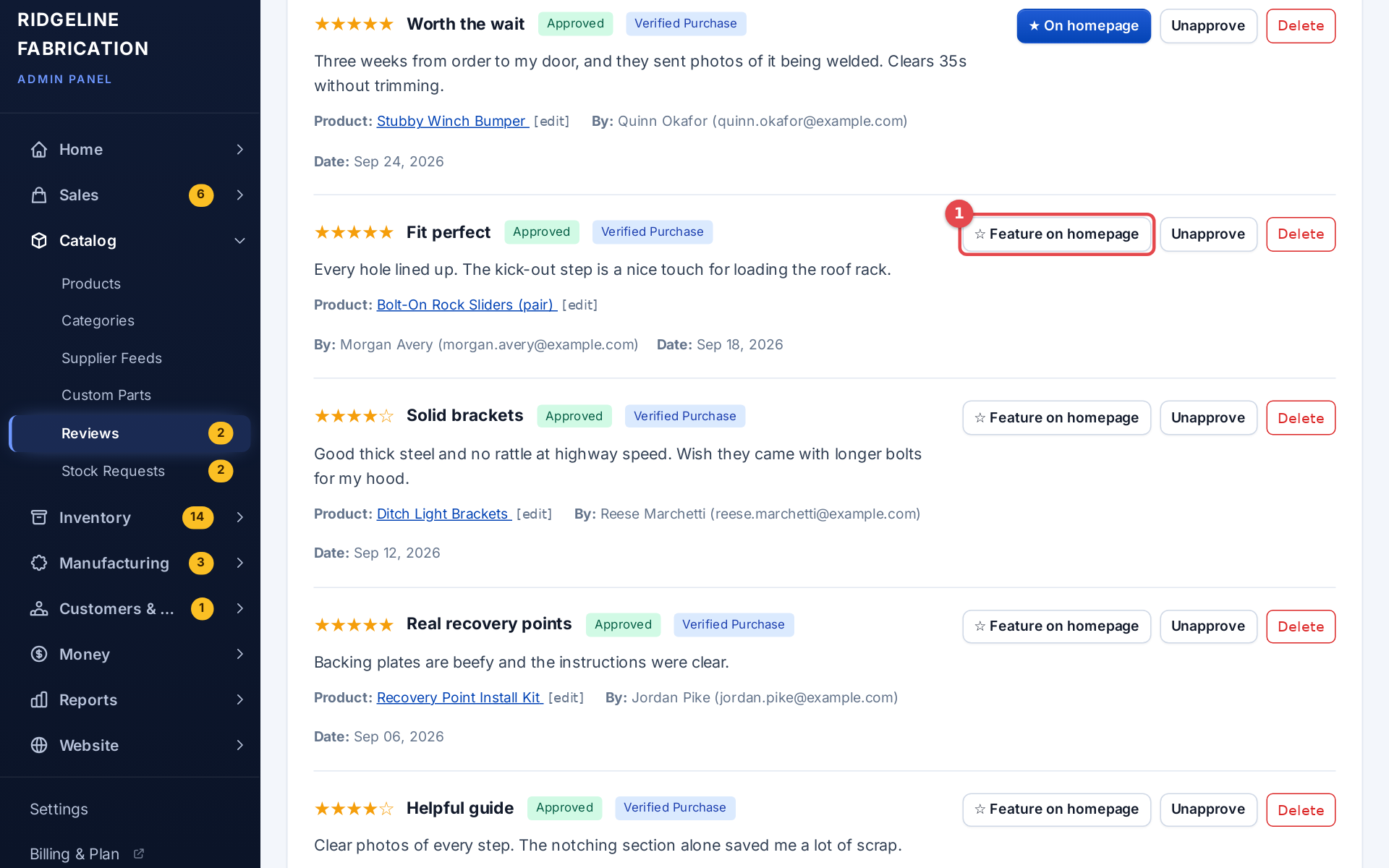 The reviews list with the Feature on homepage button
Review request log
Request Log on the reviews page lists every review request email: the order, customer, when it was sent, its status and when the link expires. Filter by Awaiting Review or Reviewed.
Review photos
Customers can add up to 5 photos to a review (JPEG, PNG, GIF or WebP, up to 5 MB each). Photos appear with the review, and a Customer Photos gallery sits at the top of the product's reviews. Click a photo to open it full size.
Where reviews show
- Product pages: the product's approved reviews, with a sort (Highest Rated, Lowest Rated, Newest First, Oldest First) and a link to a page with all of that product's reviews
- Store reviews page at
/reviewson your store: your average rating, a five-to-one-star breakdown (click a bar to show only those reviews), a sort, and every approved review with its product
Only approved reviews are ever shown.
Reviews on your homepage
- Add a Testimonials section on Website → Homepage to show a reviews band: your rating and up to three quotes, each naming its product, with a link to all reviews.
- To choose the quotes, press ☆ Feature on homepage on up to 3 approved reviews in Catalog → Reviews. The button changes to ★ On homepage; press it again to take the review off. On homepage (n) filters to them.
- With none featured, the band picks your latest five-star reviews.
- On the Trailhead theme, the homepage hero also shows your star rating and review count once you have enough reviews. Turn it off in the theme's Customize panel: Homepage blocks → Rating under the hero. See Theme.
Importing reviews
Reviews brought over from another platform carry an Imported badge, and the Imported filter shows just them. Use [edit] to move an imported review onto the right product.